Digital sales room software for enterprise deals
Give every buying group one branded, secure room for the proposal, the evidence and the next steps, and see which stakeholder read what.
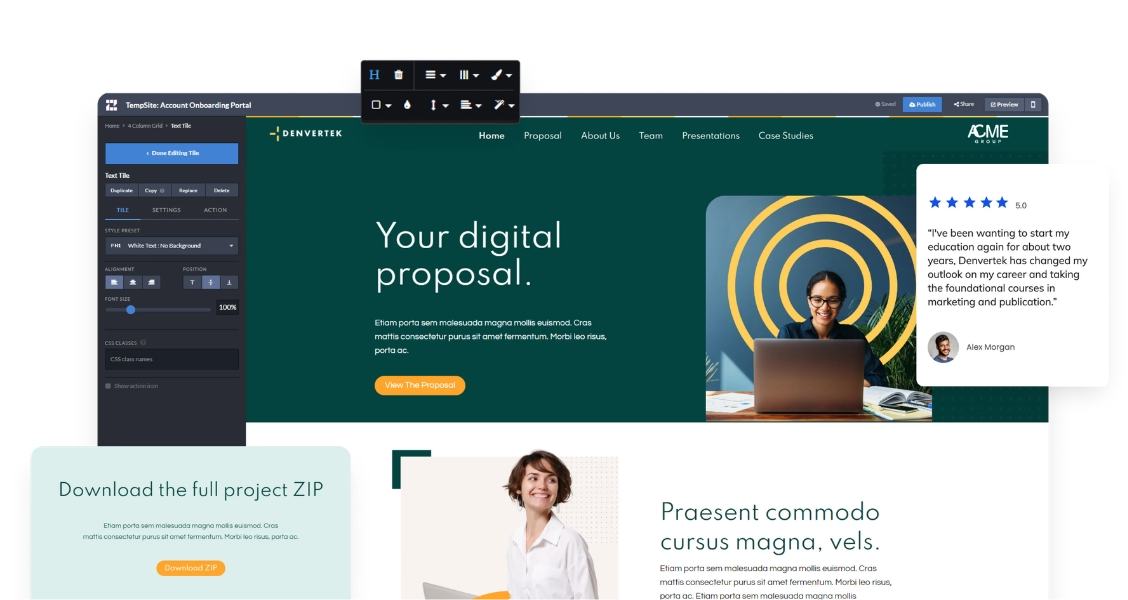
Give every buying group one branded, secure room for the proposal, the evidence and the next steps, and see which stakeholder read what.
A digital sales room replaces the email thread, the PDF attachment and the shared drive folder with one private, branded space for a single deal. The buying committee finds the proposal, the case studies, the security answers and the pricing in the same place, and each stakeholder reads the part that matters to them.
For the seller, the room is also a signal. Zoomforth shows which named stakeholder opened the room, which sections they read and whether someone new joined the evaluation, so follow-up starts from what the buyer actually did. For the full background, read our guide to what a digital sales room is and how it works. If your team sends proposals and RFP responses today, see how the same rooms work as interactive proposals and sales microsites.
Enterprise deals involve procurement, IT, finance and legal as well as your champion. The room has to show you who is engaged and keep the content in front of the right people only.
See engagement per visitor, not only per page: which stakeholder opened the room, which sections they read, how long they stayed and when a new name appears. Read more on Zoomforth engagement analytics.
Make a room public, password protected, limited to approved email addresses or domains, protected with multi-factor authentication, or placed behind your SAML single sign-on.
Four user roles range from full administration to restricted access to specific sites, editing tools and publishing rights. Zoomforth is SOC 2 Type II audited; see the security overview.
These three tools answer different questions. A digital sales room does not replace your internal enablement platform; it is the part of the stack the buyer sees.
| Digital sales room | PDF proposal | Sales enablement platform | |
|---|---|---|---|
| Who uses it | The buying group, shared by the seller | The buyer, as an attachment | The seller's own team |
| What it holds | Proposal, evidence, video, pricing and next steps for one deal | A fixed document | The internal content library, training and coaching |
| After sending | Updated in place; the link stays the same | Resent as a new version | Content is sent out through other channels |
| Engagement data | Per stakeholder and per section | None once forwarded | Mostly rep activity and content usage |
| Access control | Password, email authentication, MFA or SSO per room | Whoever has the file | Internal users |
| Best for | Complex, multi-stakeholder enterprise deals | Simple, single-reader quotes | Managing and coaching a large sales team |
If you are weighing the two categories, our comparison of a digital sales room vs. a sales enablement platform goes deeper, and the buyer-facing sales enablement platform page shows how Zoomforth fits next to the tools you already run. To compare vendors, see how to choose digital sales room software.
Deal rooms, pitch sites and leave-behinds built by enterprise sales teams on Zoomforth.
RFP responses published as secure microsites next to the formal submission.
How rooms differ for SaaS, professional services and other complex sales.
Three of the Big Four accounting firms use Zoomforth for client pursuits and proposals, and Zoomforth is rated 4.76/5 on G2.
If you're working in a deeply competitive, low differentiation, and highly technical space, or selling anything that's commoditized, microsites are a great way to help make complex, multi-stakeholder, multi-phase buying easier.
Lily Austin, Principal Advisor, Value Engineering at Salesloft
How a proposal team at a Big Four firm closed multiple Fortune 50 deals with microsites.
Enhancing sales communication and value engineering with Zoomforth.
Winning deals with microsites as part of a digital transformation.
A digital sales room is a private, branded web space shared with one buying group. It holds the proposal, supporting evidence, pricing and next steps for a single deal, and shows the seller which stakeholder viewed which content. Zoomforth builds each room as a secure microsite that sales teams create from templates without code.
A PDF proposal is a fixed file: once sent, it can be forwarded, it goes out of date, and the seller cannot see whether anyone read it. A digital sales room is one secure link that the seller keeps up to date, that can hold video and supporting documents, and that reports which stakeholder opened which section.
No. A sales enablement platform manages content, training and coaching for the seller's own team. A digital sales room is buyer-facing: it is the space the buying group actually opens. Many enterprise teams run both, with the enablement platform as the internal library and Zoomforth as the branded room each buyer sees.
Each room can be public, password protected, restricted to approved email addresses or domains through emailed login links, protected with multi-factor authentication, or placed behind your SAML single sign-on. Zoomforth is SOC 2 Type II audited, and content is encrypted in transit and at rest.
Yes. Zoomforth reports engagement per visitor, not only per page: who opened the room, which sections they read, how long they spent and when new stakeholders appear. Sellers can also turn on real-time email notifications so they know the moment a stakeholder engages.
Pricing is quote-based and depends on the number of user seats and add-ons such as a custom domain or integration. Request a demo for a quote.
Bring teams together with a data-rich collaborative ABM solution. Build custom microsites, engage target accounts with personalized digital content experiences, and analyze in real-time—all in a single, intuitive platform.
Learn more: Account-based marketing platform for personalized ABM micrositesShare deliverables, video and updates with each client in one branded, secure space, and see which people on the client side actually use it.
Learn more: Branded client portal software for professional services firmsCreate branded, interactive content experiences with our enterprise content marketing platform. Share dynamic content, win more business, and track how your audience engages with your brand—Zoomforth has you covered.
Learn more: An enterprise content marketing platform to take control of your brandInteractive, promotional microsites to host your competition, sweepstakes, or contest.
Learn more: Grow your brand with custom contest and sweepstakes micrositesShowcase your creativity with personalized, branded microsites.
Learn more: A creative agency platform for captivating customer experiencesGive every new customer one branded, secure portal for welcome content, training and kickoff materials, then keep using it for QBRs and renewals. Never lose an email attachment again.
Learn more: Customer onboarding software with branded onboarding portalsEnterprise software for lead generation: elevate your customer experience with custom-built, on-brand microsites.
Learn more: An enterprise lead generation platform for quality B2B leadsAn intuitive product page improves user experience and streamlines sales. Guide your customers through a clear buying experience with a personalized product microsite.
Learn more: Build personalized microsites for every product launchTalent acquisition is a highly competitive undertaking. Communicate organizational value, not just a job description.
Learn more: Enterprise recruitment software for branded micrositesEmpower your sales team with dynamic content and customized client engagement
Learn more: Sales enablement platform for enterprise teams
 Trusted by Fortune 500 sales, marketing & HR teams


