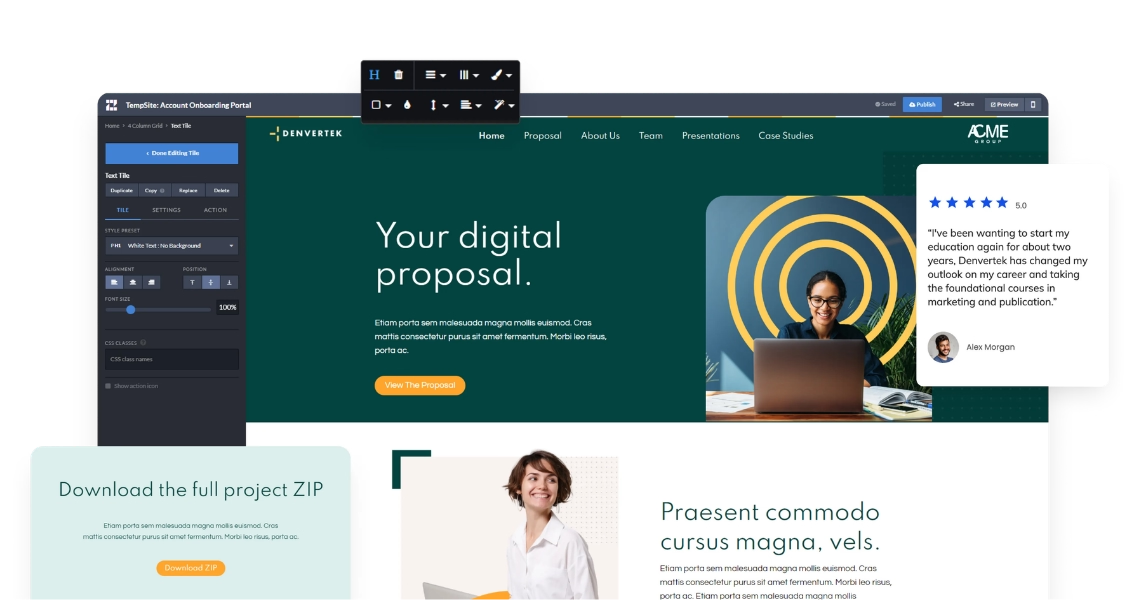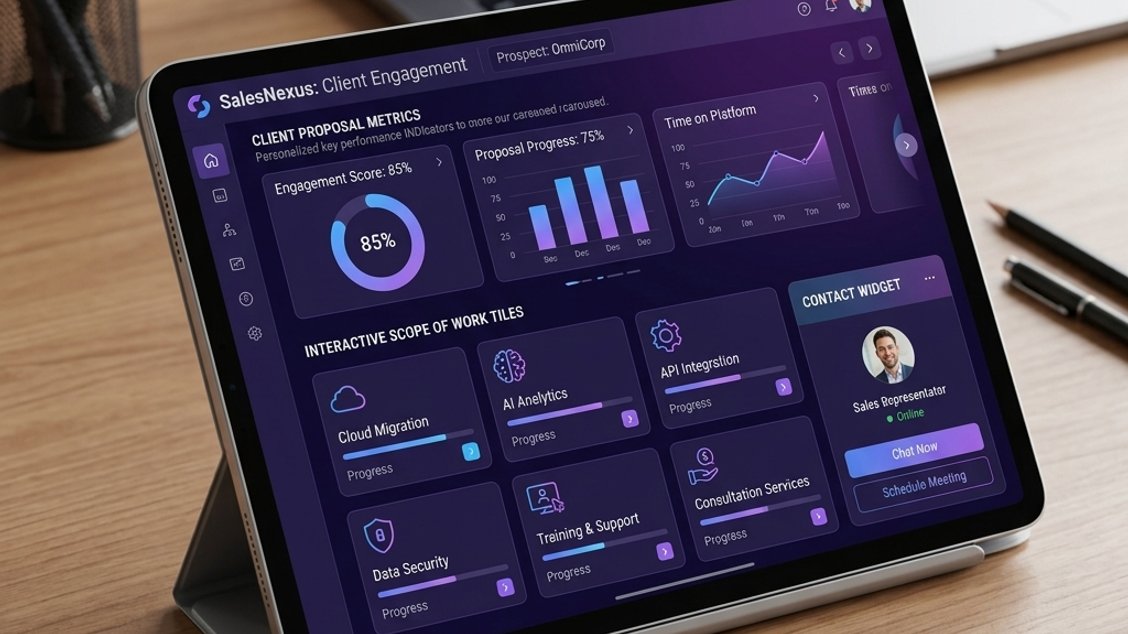
A digital sales room is a branded, interactive microsite that centralizes all deal-related content — proposals, videos, contracts, and case studies — in one shareable link. Unlike static PDFs, a digital sales room lets buyers explore content at their own pace while giving sellers real-time engagement data. It shortens sales cycles and improves the buying experience. The traditional B2B sales process relies on email chains, static documents, and manual follow-ups — a workflow designed for a pre-internet era. As buying committees grow larger and buyers expect self-serve access to information, these methods break down. The digital sales room emerged to fix this: a single, secure link replaces scattered attachments, engagement data replaces guesswork, and continuous updates eliminate version confusion.
The term “digital sales room” (DSR) has gained significant traction since 2022 as enterprise buyers — now accustomed to self-serve research — expect a more structured buying experience. Zoomforth’s digital sales room software is built specifically for this use case, and this guide explains what DSRs are, how they work, and how to create one.
Ready to go digital?
Discover how Zoomforth can help you.
Join 500+ enterprise sales, marketing and HR teams building trackable microsites — no developer needed.
Rated 4.76/5 on G2 · Trusted by Fortune 500 teams
Thanks — we've got your request.
We'll be in touch by email to set up your demo.
While you wait, browse real microsites in our microsite inspiration gallery or learn the basics in the Zoomforth Academy.
Digital sales room definition
A digital sales room is a secure, personalized web space created by a seller for a specific buyer or deal. It replaces the standard approach of emailing attachments and tracking down responses with a single, organized link that contains everything a buyer needs to evaluate and approve a purchase.
The “room” metaphor is intentional: think of it as a private space where the buyer’s team can gather to review materials, ask questions internally, and share content with colleagues — with the seller able to see the activity without intruding. That is why a digital sales room for B2B deals, where five to ten stakeholders review the same purchase, works better than any single document.
Modern B2B buying committees average six to ten stakeholders, each with distinct information needs. The economic buyer cares about ROI and total cost of ownership. IT needs technical validation and security documentation. Legal reviews contract terms and compliance requirements. Procurement evaluates pricing and service-level agreements. A digital sales room serves all these personas from a single link, letting each stakeholder access the content relevant to their role without waiting for a forward or a follow-up call.
Digital sales rooms sit at the intersection of three categories:
- Microsites — small, branded web experiences built for a single purpose or audience
- Buyer portals — organized spaces for deal-related materials and communication
- Sales content management — curated delivery of the right content at the right deal stage
Zoomforth microsites for sales combine all three. Each DSR built with Zoomforth is a branded, responsive microsite that a rep can configure in minutes using templates designed for enterprise deals.
Why traditional sales proposals are broken
For decades, B2B sales teams have relied on the same approach: build a proposal in a document editor, convert it to PDF, attach it to an email, and hit send. This workflow persists out of habit, not effectiveness. Here is why the traditional proposal fails modern buyers:
PDFs are static by nature. A PDF captures information at a single moment in time. If pricing changes, a case study is released, or a new reference becomes available, the rep must create a new version and resend it. The buyer never knows which version is current, and the rep never knows whether the buyer saw the update.
Email chains create chaos. A typical enterprise deal generates dozens of emails — the initial proposal, follow-up questions, revised terms, stakeholder introductions — all scattered across inboxes. Key context gets buried. Stakeholders who join late miss critical information. The buying experience becomes a hunt for attachments rather than a structured evaluation.
There is no visibility into buyer engagement. With a PDF, the seller knows only one thing: whether the buyer opened the email. What they reviewed, how long they spent on pricing, which sections they skipped, whether other stakeholders participated — all invisible. Every follow-up call starts from zero context.
Version control is manual and error-prone. Without a central source of truth, multiple versions of a proposal circulate simultaneously. A buyer might review an outdated draft while the seller has already updated terms. This friction erodes trust and slows the deal.
The buying committee is fragmented. Enterprise purchases involve six to ten stakeholders across functions — legal, procurement, IT, security, and the economic buyer. A PDF sent to one person must be forwarded manually, with no way to track who else has seen it or what they think.
These problems add up to a broken buying experience. For a deeper look at how modern sales content management solves these issues, see our sales hub.
How a digital sales room works step by step
Here is what a typical digital sales room workflow looks like for a B2B deal:
1. The rep creates the room. Using a template, the rep builds a personalized microsite for the deal. This includes the buyer’s logo and branding, a welcome message, the proposal, supporting case studies, product videos, pricing summary, and a clear CTA (schedule a call, sign the contract, download the summary).
2. The rep shares a secure link. The buyer receives one link — not a chain of seven email attachments. The link can be password-protected, restricted to specific email domains, or open to anyone with the URL.
3. The buyer explores the room. The buyer’s team reviews the materials on their timeline, shares the link internally with legal, procurement, or technical stakeholders, and watches the embedded product demo without scheduling a separate call.
4. The seller tracks engagement. The seller sees which sections were viewed, how long each stakeholder spent on pricing, how many people accessed the room, and whether new viewers (previously unknown stakeholders) have appeared. This intelligence shapes every follow-up conversation.
5. The seller updates the room as the deal progresses. New case studies, revised pricing, updated contract terms — all pushed to the same link without resending anything. The buyer always sees the most current version.
This is the fundamental advantage of a DSR over a PDF proposal: the deal keeps moving even when no one is on a call.
Each of these steps maps to a specific pain point in the traditional sales workflow. Creating the room replaces document assembly. Sharing a link replaces email chaos. Self-serve exploration replaces scheduling friction. Engagement tracking replaces guesswork. Continuous updates replace version control headaches. The DSR does not just digitize the proposal — it restructures the entire deal workflow around how buyers actually want to buy.
Digital sales room vs. traditional proposal: why the comparison matters
The digital sales room benefits are clearest side by side with the format it replaces:
| Criteria | Traditional PDF proposal | Digital sales room |
|---|---|---|
| Format | Static, linear document | Interactive, navigable microsite |
| Delivery | Email attachment | Secure shared link |
| Analytics | None | Visitor, section, and time-on-page data |
| Updates | Resend the file | Edit the room; buyer sees changes immediately |
| Stakeholder sharing | Forwarded emails | Single link shared across buying committee |
| Branding | Limited to document templates | Fully branded to buyer or seller |
| Multimedia | Embedded with file size limits | Embedded video, animation, interactive elements |
| Version control | Manual | Automatic |
The practical implication: with a PDF proposal, you send once and wait. With a digital sales room, the deal continues without you.
For an existing post on presenting proposals effectively, see our complete guide to proposal presentations.
Digital sales room vs microsite: what’s the difference?
The terms “digital sales room” and “microsite” are often used interchangeably, but the distinction matters when choosing the right approach for your deal.
A microsite is the broader category. A microsite is any small, standalone web experience designed for a specific purpose or audience. Marketing teams build microsites for product launches, event landing pages, campaign hubs, and interactive infographics. These microsites are typically public or semi-public, with content designed for a broad audience.
A digital sales room is a microsite purpose-built for a sales deal. It inherits all the benefits of a microsite — custom branding, rich media, responsive design, no code required — but adds capabilities specific to the sales workflow:
- Deal-specific access controls. Unlike a public marketing microsite, a DSR restricts access to the buyer’s team, with password protection, domain whitelisting, and optional expiry dates.
- Stakeholder tracking. A DSR surfaces which individuals from the buying committee viewed which sections, for how long, and when. A standard microsite analytics tool shows page views; a DSR shows person-level engagement tied to a specific deal.
- Content organized by deal stage. While a marketing microsite might lead with a hero image and a CTA, a DSR structures content around the buyer’s journey: executive summary, solution overview, technical validation, pricing, contract.
- Update without disruption. Marketing microsites are typically built once and left live. A DSR is edited continuously as the deal progresses, with changes reflected instantly on the same link.
Think of it this way: every digital sales room is a microsite, but not every microsite is a digital sales room. The difference lies in the sales-specific features — analytics, security, and deal-stage content — that transform a standard microsite into an active sales tool.
For more on the broader category, see our guide on what is a microsite. For examples of sales-focused microsites, visit our sales microsite inspiration gallery.
Key features to look for in a digital sales room
Not all digital sales room tools are equal. Here are the digital sales room features that determine whether a DSR tool actually closes deals faster:
Branded digital sales room design
The room should look like it was built specifically for the buyer. Buyers who receive a generic template experience it as a mass-produced document — even if the content is personalized. Full white-labeling (buyer logo, custom colors, custom domain) signals that the seller treated this deal as a priority and invested time in the presentation, which directly affects how seriously the buyer takes the proposal.
Buyer engagement analytics in the sales room
This is the single most valuable feature of a well-built DSR. You need to know:
- How many people accessed the room, and when
- Which sections got the most attention
- Whether someone new (an unknown stakeholder) has entered the room
- How long the buyer spent on pricing versus the case studies
Without this data, you’re flying blind in every follow-up conversation. Zoomforth’s data and analytics platform captures this information at the individual visitor level and surfaces it alongside deal-stage context, so you know not just how many people viewed your room but exactly what resonated and who to follow up with.
Deal-stage content in the sales room
A proposal is not a single document — it’s a collection of materials that serve different purposes at different moments. A DSR should let you organize content into sections: executive summary, proposed solution, case studies, pricing, FAQs, next steps. Each section serves a different member of the buying committee.
Update the sales room after sending
The ability to add, remove, or update content after the link has been sent is non-negotiable. Deals evolve. Pricing changes. New case studies become relevant. A DSR that requires you to resend a link every time you update content defeats its own purpose.
In practice, this means a rep can refine the room throughout the deal lifecycle. Early-stage prospects see thought leadership and case studies. As the deal progresses, the rep adds pricing, technical documentation, and contract terms — all without breaking the original link or asking the buyer to revisit a different URL.
Secure access to your digital sales room
Enterprise deals involve sensitive information. A single room may contain proprietary pricing, unreleased product details, and confidential contracts. Your DSR tool should support:
- Password protection per room
- Access restricted to specific email domains
- Optional expiry dates
- Audit trails of who accessed what, and when
These controls ensure that each stakeholder sees only what they need while maintaining a complete record for compliance and security reviews.
Sales enablement tools integration
The best DSR tools integrate with your CRM (Salesforce, HubSpot) and your existing content libraries so that engagement data flows directly into your pipeline records — and your deal-specific microsites don’t become yet another silo.
Digital sales room software and alternatives
The DSR category overlaps with buyer enablement tools — platforms focused on giving buyers self-serve access to deal content — and most teams evaluating a DSR are also comparing specific vendors. See how Zoomforth stacks up against the best buyer enablement tools on the market, or against specific platforms: PandaDoc, Highspot (including a head-to-head on Highspot vs. Seismic), Dock, and GetAccept.
Once the deal closes, many teams carry the same room forward as a client portal — see our breakdown of client portal software for how that transition works in practice.
Digital sales room examples across industries
Digital sales rooms work across any B2B vertical with a complex, multi-stakeholder sales cycle. Here is how they apply by industry:
Enterprise SaaS: A Zoomforth room for a SaaS deal might include a recorded product demo, a technical architecture overview for the IT team, a security FAQ for procurement, ROI data for finance, and a contract for legal — all in one link. The buying committee self-selects the content relevant to their role, reducing the need for multiple sales calls to address each stakeholder.
Professional services (consulting, legal, accounting): A consulting firm building a digital sales room for a new client might include a proposed engagement overview, bios of the project team, sample deliverables from previous engagements, and a timeline. The room replaces a 40-slide deck and three separate email threads. The prospect’s procurement team accesses security documentation and rate cards while the business stakeholders review case studies and methodology — all from the same link.
Financial services: Banks and wealth management firms use DSRs for onboarding high-value clients, consolidating account setup materials, investment policy summaries, and compliance documentation in one secure space. Relationship managers can track which documents the client reviewed, flag any missing signatures, and follow up proactively rather than waiting for the client to ask.
Healthcare and life sciences: Pharmaceutical and medical device companies use DSRs to present clinical data, regulatory documentation, and formulary positioning to hospital procurement committees — all in a structured, auditable format. The room gives each committee member role-specific access while maintaining a complete audit trail for compliance purposes.
Staffing and recruitment: Agencies use digital sales rooms to present candidate slates, company culture content, and engagement terms to hiring managers, replacing the email-attachment cycle of traditional candidate submissions. Hiring managers can review candidate materials and provide feedback directly within the room, speeding up the placement process.
See our full roundup of digital sales room examples for more on how these apply in practice, or browse the inspiration gallery.
How to create a digital sales room with Zoomforth
Creating a digital sales room with Zoomforth does not require design skills or developer support. Here is the process:
1. Choose a template. Zoomforth offers templates designed for specific deal types — proposals, RFP responses, onboarding hubs, and executive briefings. Each template is structured to guide buyers through the content in a logical sequence.
2. Personalize for the buyer. Add the prospect’s name and logo, customize colors to match their brand (or yours), and write a personalized welcome message. This takes under ten minutes.
3. Add your deal content. Upload documents, embed video, link to relevant case studies, add pricing tiles. Organize content into sections that match how this buyer’s team will evaluate the deal.
4. Set access controls. Decide who can view the room, whether a password is required, and whether you want an expiry date.
5. Set up engagement tracking. Zoomforth automatically captures who views the room, which sections they spend time on, and whether new stakeholders appear. Review these analytics in your dashboard to prepare for follow-up conversations.
6. Share the link. Send a single URL to your main contact. No attachments, no forwarding required.
7. Update as the deal progresses. Add new content, update pricing, or swap case studies. The link stays the same; the room is always current.
The entire setup — from blank template to shared link — takes most reps 20 to 45 minutes for a new deal. Compare that to the hours spent formatting a traditional proposal across multiple tools, chasing down the latest version of each document, and managing the email chain that follows. With a DSR, the time saved on admin goes directly into higher-value activities: understanding the buyer’s needs and moving the deal forward.
Ready to build your first digital sales room? Request a demo and we will walk you through a live example built for your deal type.
Frequently asked questions
What is a digital sales room?
A digital sales room (DSR) is a secure, branded online space where buyers and sellers collaborate during a deal. It centralizes proposals, contracts, videos, and resources in one shareable link, replacing scattered email threads and static PDFs.
What is the difference between a digital sales room and a proposal?
A proposal is a static document sent once. A digital sales room is a live, interactive microsite where buyers can explore content, ask questions, and access supporting materials — and sellers can track engagement in real time.
What features should a digital sales room have?
Key features include custom branding, content organized by deal stage, visitor analytics, video embedding, stakeholder-specific access controls, and the ability to update content after sharing without resending the link.
How do I create a digital sales room?
You can create a digital sales room using a platform like Zoomforth. The process involves selecting a template, uploading your deal content, applying your branding, and sharing a secure link with your buyer — no code required.