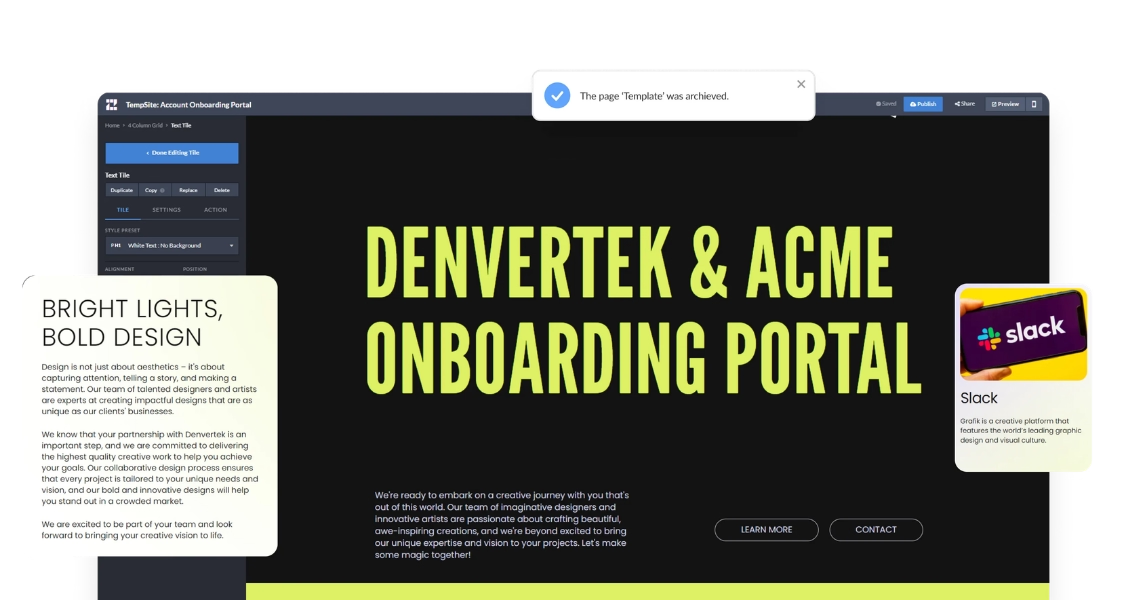
Onboarding a new client by hand — a welcome email here, a contract attachment there, a kickoff scheduled in a separate thread — works until it doesn’t. As you sign more clients, the inconsistency shows, things slip, and each onboarding reinvents the wheel. A client onboarding tool exists to make the process fast, repeatable, and professional.
This guide covers what a client onboarding tool is, the main categories, what to look for when choosing one, and how to decide which type fits your team.
Ready to send sales content you can track by stakeholder?
Join enterprise sales, marketing and HR teams building trackable microsites — no developer needed.
Rated 4.6/5 on G2 · Trusted by Fortune 500 teams
Thanks — we've got your request.
Check your inbox: we've just emailed you a link to book your demo with Wendie.
We'll email a written quote for your team to the address you gave us by the next business day.
While you wait, browse real microsites in our microsite inspiration gallery, learn the basics in the Zoomforth Academy, or see what's included in Zoomforth pricing.
What is a client onboarding tool?
A client onboarding tool is software that helps you bring new clients up to speed after they sign — organizing the welcome, the documents, the timeline, the tasks, and the communication into a repeatable process instead of a scramble.
The value is consistency and speed. A good tool means every client gets the same polished experience, your team stops rebuilding onboarding from scratch each time, and nothing important falls through the cracks during the fragile first weeks of a relationship. Where a client onboarding checklist defines what needs to happen, a tool is how you deliver it reliably at scale.
Four types of client onboarding tools and when each fits
“Client onboarding tool” covers several categories that solve different parts of the problem. Knowing which category you actually need is most of the decision.
| Category | What it does | Best when your priority is |
|---|---|---|
| Project / task management | Tracks internal onboarding tasks and owners | Managing your team’s workflow |
| Document & e-signature | Handles contracts and signatures | Getting paperwork signed fast |
| Communication | Centralizes messages and updates | Staying in touch during onboarding |
| Client-facing portal | Gives clients one branded home for everything | The client’s experience and first impression |
Most teams already own a project tool and an e-signature tool. What they usually lack is the fourth category — a client-facing destination, such as the branded onboarding portals Zoomforth builds. That gap is why onboarding still feels disorganized to clients even when the internal task list is under control: the client never sees the task board, they see the pile of emails.
What to look for in client onboarding software: seven criteria
Whatever category you weigh, judge candidates against criteria that predict whether onboarding actually improves.
- A strong client-facing experience. The client’s view should be branded, organized, and easy to navigate — not an internal dashboard bolted on.
- Reusable templates. You should be able to build your onboarding once and reuse it for every client, not rebuild each time.
- Personalization. The tool should let you tailor each client’s experience without a developer.
- Ease of use for non-technical staff. Account managers, not engineers, should be able to run it. No-code matters.
- Analytics. Seeing what a client has viewed lets you follow up proactively when something stalls.
- Document handling. Contracts, resources, and assets should live in one accessible place.
- Integration with your stack. It should fit alongside the tools you already use rather than replace all of them.
The tools that move the needle most are the ones that improve what the client experiences — because onboarding is where retention is won or lost. For the practices that make any tool effective, see our guide to the client onboarding process.
Which customer onboarding tools fit your team’s biggest gap?
The decision comes down to your single biggest gap. Ask which of these best describes your problem:
- “Our team drops tasks and loses track of who owns what.” Start with a project-management tool.
- “Getting contracts signed takes too long.” Prioritize a document and e-signature tool.
- “Clients say onboarding feels disorganized and our first impression is weak.” You need a client-facing portal.
That third problem is the most common and the most damaging, because it is the one the client actually feels. If it describes you, a no-code portal builder is the strongest fit — and it’s where a microsite platform earns its place.
With Zoomforth, you build a branded client onboarding portal as a microsite: create a template once, clone it for each new client, personalize the details, and share a single link. You get the reusable templates, personalization, no-code editing, and view analytics from the criteria above in one place — which is why teams focused on the client experience and on customer success reach for it.
The point isn’t to replace every tool you own. It’s to close the gap most onboarding tools leave open: the destination the client actually experiences.
Ready to give new clients an onboarding experience that reflects how good your service is? Request a demo to see how Zoomforth teams build reusable client onboarding portals without code.
Frequently asked questions
What tools are used for client onboarding?
Teams use several categories of tools for client onboarding: project and task tools to manage the workflow, document and e-signature tools for contracts, communication tools for updates, and client-facing portal tools that give the client one branded place for everything they need. Many teams combine several, but a portal tool is what the client actually experiences.
What is the best client onboarding software?
There is no single best option — the right software depends on whether your priority is managing your team's tasks, collecting documents, or giving clients a polished self-serve experience. If the client's first impression and a single branded destination matter most, a no-code portal builder is usually the strongest fit. If internal task tracking is the priority, a project-management tool may serve better.
How much does a client onboarding tool cost?
Pricing varies widely by category and by how many clients or users you onboard. General project and communication tools are often billed per user per month. Dedicated client-portal and onboarding platforms are usually priced by plan tier or by the number of client-facing sites. The more relevant question than price is whether the tool improves retention and saves your team hours per client.
Can I use a microsite as a client onboarding tool?
Yes. A microsite is well suited as a client onboarding tool because it gives each client a single branded destination for their welcome content, documents, timeline, and next steps. A no-code microsite platform lets you build a reusable onboarding template, clone it for each client, personalize it, and track what the client has viewed.